How to log a dose
The fast path: one tap from Today
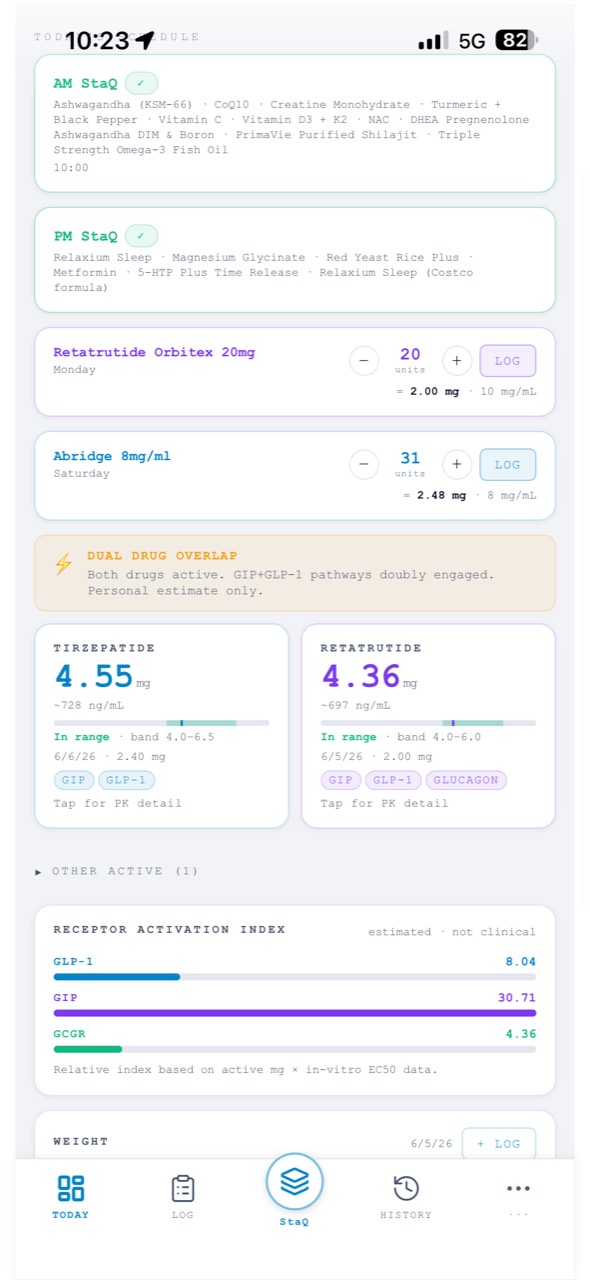
Items due today appear on your Today screen with a one-tap log button — tap and it's recorded at your scheduled dose. This is the everyday path: open the app, tap, done. Any medication or supplement with Show on Today screen turned on gets a quick-log row here, even when it isn't part of a StaQ.
The full path: the Log screen
The Log tab is for everything the one-tap button doesn't cover — a different amount than scheduled, a missed-then-made-up dose, or context you want in the record. It's organized into four tabs:
- Meds & StaQs — log a single dose at any amount and time, a whole StaQ at once, or a one-off supplement. Injectables are dialed in syringe units; StaQ resolves the mg from your vial's concentration.
- Check-in — dial how you're feeling across Physical, Mental, and Mood on a simple 0–4 scale, and add your own metrics to track.
- Numbers — your weigh-in and other numbers, plus injection-site notes after a shot, so rotation patterns and site issues show up in your history.
- Labs — scan or upload a lab report (photo or PDF) and StaQ pulls the values in; you review everything before it saves.
Why accuracy beats neatness
Log what actually happened — the real amount, the real day. A late or skipped dose isn't a failure to hide from the record; it's exactly what makes your exposure curve honest, and it's the difference between a chart your provider can trust and a diary of good intentions. The model decays from your actual logs, so the truth is what makes the math work.